如果想用C语言格式化磁盘,下面是一些资料。
------------------------------------
------------------------------------
来源:
===============================================================================
GNU libparted API
===============================================================================
by Andrew Clausen <clausen@gnu.org>
Copyright (C) 1999, 2000, 2001, 2002, 2003 Free Software Foundation, Inc.
Permission is granted to copy, distribute and/or modify this document
under the terms of the GNU Free Documentation License, Version 1.1
or any later version published by the Free Software Foundation;
with the no Invariant Sections, with the no Front-Cover Texts, and
with no Back-Cover Texts. A copy of the license is included in the
file, COPYING.DOC.
CONTENTS
--------
1 Introduction
2 Initialising libparted
3 PedDevice
4 PedDisk, PedDiskType
5 PedGeometry
6 PedPartition, PedPartitionType
7 PedFileSystem, PedFileSystemType
8 PedConstraint, PedAlignment
9 PedTimer
10 Exceptions
-------------------------------------------------------------------------------
1 INTRODUCTION
-------------------------------------------------------------------------------
GNU Parted is built on top of libparted, which does all of the real work.
libparted provides an API capable of manipulating partition tables, and
the filesystems on them.
The main motivation for separating the back-end into a separate library was
to encourage different GNU/Linux distributions to encorporate their own
customized front-end into the install process.
This documents the API -- not the implementation details of libparted.
Documentation that is not relevant to programs using the API are marked with
INTERNAL. Apart from this file, a good place to look would be
parted/parted.c, the front-end's source, and the TUTORIAL file (not finished
yet!).
This documentation isn't as complete as it should be. Feel free to ask
questions, either to me personally (clausen@gnu.org), or to the mailing list
(bug-parted@gnu.org).
1.1 TERMINOLOGY
-------------------
Some of the terminology is a bit weird, so you might want to read this.
CONSTRAINT a set of conditions that must be satisfied, for
a given GEOMETRY of a PARTITION.
DEVICE a storage device.
DISK a storage device, with a valid partition table.
EXCEPTION an event that needs attention.
EXTENDED PARTITION a PRIMARY PARTITION, that may contain LOGICAL
PARTITIONS instead of a file system. There is at most
one extended partition.
FILE SYSTEM any data that resides on a partition. For the purposes
for GNU Parted, this includes swap devices.
GEOMETRY a description of a continuous region on a disk. eg,
partitions have a geometry.
HIDDEN PARTITION a partition that is hidden from MS operating systems.
Only FAT partitions may be hidden.
LOGICAL PARTITION like normal partitions, but they lie inside the
extended partition.
PARTITION a continuous region on a disk where a file system may
reside.
PRIMARY PARTITION a normal, vanilla, partition.
PARTITION TABLE also, DISK LABEL. A description of where the
partitions lie, and information about those partitions.
For example, what type of file system resides on them.
The partition table is usually at the start of the
disk.
TIMER a progress meter. It is an entity that keeps track
of time, and who to inform when something interesting
happens.
1.2 DESIGN
--------------
libparted has a fairly object-oriented design. The most important objects are:
PedArchitecture describes support for an "archicture", which is sort
of like "operating system", but could also be,
for example, another libparted environment, EVMS, etc.
PedConstraint a constraint on the geometry of a partition
PedDevice a storage device
PedDisk a device + partition table
PedFileSystem a filesystem, associated with a PedGeometry, NOT a
PedPartition.
PedGeometry a continious region on a device
PedPartition a partition (basically PedGeometry plus some attributes)
PedTimer a timer keeps track of progress and time
All functions return 0 (or NULL) on failure and non-zero (or non-NULL) on
success. If a function fails, an exception is thrown. This may be handled by
either an exception handler, or the calling function (see the section on
exceptions).
All objects should be considered read-only; they should only be modified by
calls to libparted's API.
-------------------------------------------------------------------------------
2 INITIALISING LIBPARTED
-------------------------------------------------------------------------------
Headers for libparted can be included with:
#include <parted/parted.h>
Parted automatically initialises itself via an __attribute__ ((constructor))
function.
However, you might want to set the exception handler with
ped_exception_set_handler(). libparted does come with a default exception
handler, if you're feeling lazy.
Here's a minimal example:
#include <parted/parted.h>
int
main()
{
/* automatically initialized */
ped_exception_set_handler(exception_handler); /* see section 7 */
return 0;
/* automatically cleaned up */
}
-----------------------------------------------------------------------------
3 PEDDEVICE
-----------------------------------------------------------------------------
interface: <parted/device.h>
implementation: libparted/device.c, libparted/llseek.c.
When ped_device_probe_all() is called, libparted attempts to detect all
devices. It constructs a list, which can be accessed with
ped_device_get_next().
If you want to use a device that isn't on the list, use
ped_device_get(). Also, there may be OS-specific constructors, for creating
devices from file descriptors, stores, etc. For example,
ped_device_new_from_store().
3.1 FIELDS
--------------
#define PED_SECTOR_SIZE 512
typedef long long PedSector;
/* removal from API planned */
typedef enum {
PED_DEVICE_UNKNOWN = 0,
PED_DEVICE_SCSI = 1,
PED_DEVICE_IDE = 2,
PED_DEVICE_DAC960 = 3,
PED_DEVICE_CPQARRAY = 4,
PED_DEVICE_FILE = 5,
PED_DEVICE_ATARAID = 6,
PED_DEVICE_I2O = 7
} PedDeviceType;
typedef struct _PedCHSGeometry PedCHSGeometry;
struct _PedCHSGeometry {
int cylinders;
int heads;
int sectors;
};
typedef struct _PedDevice PedDevice;
struct _PedDevice {
PedDevice* next;
char* model;
char* path;
PedDeviceType type; /* removal from API planned */
int sector_size;
PedSector length;
int open_count;
int dirty;
int external_mode;
int boot_dirty;
PedCHSGeometry hw_geom;
PedCHSGeometry bios_geom;
short host, did;
void* arch_specific;
};
Useful fields are:
char* model A description of the hardware manufacturer and
model.
char* path Usually the block device. Eg. /dev/sdb
PedSector length The size of the device, in sectors
3.2 FUNCTIONS
-----------------
void ped_device_probe_all ()
Attempts to detect all devices.
void ped_device_free_all ()
Closes/frees all devices. Called by ped_done(), so you do not need
to worry about it.
PedDevice* ped_device_get (char* name)
Gets the device "name", where name is usually the block device, e.g.
/dev/sdb. If the device wasn't detected with ped_device_probe_all(),
an attempt will be made to detect it again. If it is found, it will
be added to the list.
PedDevice* ped_device_get_next (PedDevice* dev)
Returns the next device that was detected by ped_device_probe_all(), or
calls to ped_device_get_next(). If dev is NULL, returns the first
device. Returns NULL if dev is the last device.
int ped_device_open (PedDevice* dev)
Attempts to open dev, to allow use uf ped_device_read(),
ped_device_write() and ped_device_sync(). Returns zero on failure.
May allocate resources. Any resources allocated here will
be freed by a final ped_device_close(). (ped_device_open() may be
called multiple times... it's a ref-count-like mechanism)
int ped_device_close (PedDevice* dev)
Closes dev. Returns zero on failure.
If this is the final close, then resources allocated by
ped_device_open() are freed.
void ped_device_destroy (PedDevice* dev)
Destroys a device and removes it from the device list, and frees
all resources associated with the device (all resources allocated
when the device was created).
int ped_device_read (PedDevice* dev, void* buffer, PedSector start,
PedSector count)
INTERNAL: Reads count sectors, beginning with sector start, from dev.
Returns zero on failure.
int ped_device_write (PedDevice* dev, void* buffer, PedSector start,
PedSector count)
INTERNAL: Writes count sectors, beginning with sector start, from dev.
Returns zero on failure.
int ped_device_sync (PedDevice* dev)
INTERNAL: Flushes the write cache.
Returns zero on failure.
int ped_device_begin_external_access (PedDevice* dev)
Begins external access mode. External access mode allows you to
safely do IO on the device. If a PedDevice is open, then you should
not do any IO on that device, e.g. by calling an external program
like e2fsck, unless you put it in external access mode. You should
not use any libparted commands that do IO to a device, e.g.
ped_file_system_{open|resize|copy}, ped_disk_{read|write}), while
a device is in external access mode.
Also, you should not ped_device_close() a device, while it is
in external access mode.
Note: ped_device_begin_external_access_mode() does things like
tell the kernel to flush its caches.
Returns zero on failure.
int ped_device_end_external_access (PedDevice* dev)
Ends external access mode.
Note: ped_device_end_external_access_mode() does things like
tell the kernel to flush it's caches.
Returns zero on failure.
-----------------------------------------------------------------------------
4 PEDDISK, PEDDISKTYPE
-----------------------------------------------------------------------------
interface: <parted/disk.h>
implementation: libparted/disk.c
Most programs will need to use ped_disk_new() or ped_disk_new_fresh() to get
anything done. A PedDisk is always associated with a device, and has a
partition table. There are different types of partition tables (or disk
labels). These are represented by PedDiskType's.
4.1 FIELDS
--------------
typedef enum {
PED_DISK_TYPE_EXTENDED=1, /* supports extended partitions */
PED_DISK_TYPE_PARTITION_NAME=2 /* supports partition names */
} PedDiskTypeFeature;
struct _PedDiskType {
PedDiskType* next;
char* name;
PedDiskOps* ops;
PedDiskTypeFeature features; /* bitmap of supported features */
};
Useful fields are:
char* name the name of the partition table type.
struct _PedDisk {
PedDevice* dev;
PedDiskType* type;
PedPartition* part_list;
void* disk_specific;
/* office use only ;-) */
int needs_clobber;
int update_mode;
};
Useful fields are:
PedDevice* dev the device where the partition table lies
PedDiskType* type the type of disk label
PedPartition* part_list this is the list of partitions on the disk.
It should be accessed with
ped_disk_next_partition()
4.2 FUNCTIONS
-----------------
PedDiskType* ped_disk_type_get_next (PedDiskType* type)
Returns the next disk type registers, after "type". If "type" is
NULL, returns the first disk type. If "type" is the last registered
disk type, returns NULL.
PedDiskType* ped_disk_type_get (char* name)
Returns the disk type with a name of "name". If there are none,
returns NULL.
int ped_disk_type_check_feature (const PedDiskType* disk_type,
PedDiskTypeFeature feature)
Returns 1 if the partition table type, "disk_type" has support
for "feature". Returns 0 otherwise.
PedDiskType* ped_disk_probe (PedDevice* dev)
Returns the type of partition table detected on "dev", or NULL
if none was detected.
int ped_disk_clobber (PedDevice* dev)
Overwrites all partition table signatures on "dev".
int ped_disk_clobber_exclude (PedDevice* dev, const PedDiskType* exclude)
Overwrites all partition table signatures on "dev", EXCEPT
the signature for type "exclude".
PedDisk* ped_disk_new (PedDevice* dev)
Constructs a PedDisk object from dev, and reads the partition table.
Returns zero on failure.
WARNING: this can modify dev->cylinders, dev->heads and dev->sectors,
because the partition table might indicate that the existing values
are incorrect.
PedDisk* ped_disk_new_fresh (PedDevice* dev, PedDiskType* type)
Creates a partition table on dev, and constructs a PedDisk object for
it. Returns NULL on failure.
PedDisk* ped_disk_duplicate (PedDisk* disk)
Returns a "deep" copy of "disk" or NULL on failure.
void ped_disk_destroy (PedDisk* disk)
Closes "disk".
int ped_disk_commit (PedDisk* disk)
Writes the partition table to "disk" (i.e. disk->dev), and informs
the operating system of the new layout. This is implemented by
calling ped_disk_commit_to_dev() and then ped_disk_commit_to_os().
Returns 0 on failure.
int ped_disk_commit_to_dev (PedDisk* disk)
Writes the partition table to "disk" (i.e. disk->dev).
Returns 0 on failure.
int ped_disk_commit_to_os (PedDisk* disk)
Tells the operating system kernel about the partition table layout
of disk. This is rather loosely defined... depending on which
operating system, etc. For example, on old versions of Linux,
it simply calls the BLKRRPART ioctl, which tells the kernel to
reread the partition table. On newer versions (2.4.x), it will
use the new blkpg interface to tell Linux where each partition
starts/ends, etc. In this case, Linux need not have support for
this type of partition table.
Returns 0 on failure.
int ped_disk_check (PedDisk* disk)
Checks for errors on the partition table, "disk". Note: most
error checking occurs when the partition table is loaded from
disk, in ped_disk_new(). Returns 1 for no errors, 0 otherwise.
void ped_disk_print (PedDisk* disk)
Prints a summary of disk's partitions. Useful for debugging.
int ped_disk_add_partition (PedDisk* disk, PedPartition* part,
PedConstraint* constraint)
Adds "part" to "disk".
"part"'s geometry may be changed, subject to "constraint".
You could set "constraint" to ped_constraint_exact(&part->geom), but
many partition table schemes have special requirements on the start
and end of partitions. Therefore, having an overly strict constraint
will probably mean that ped_disk_add_partition() will fail (in which
case, "part" will be left unmodified)
"part" is assigned a number (part->num) in this process.
Returns 0 on failure.
int ped_disk_remove_partition (PedDisk* disk, PedPartition* part)
Removes "part" from "disk". If "part" is an extended partition,
it must contain no logical partitions.
"part" is *NOT* destroyed. The caller must call
ped_partition_destroy(), or use ped_disk_delete_partition() instead.
int ped_disk_delete_partition (PedDisk* disk, PedPartition* part)
Removes "part" from "disk", and destroys "part". Returns 0 on failure.
int ped_disk_delete_all (PedDisk* disk)
Removes and destroys all partitions on "disk". Returns 0 on failure.
int ped_disk_set_partition_geom (PedDisk* disk, PedPartition* part,
PedConstraint* constraint, PedSector start,
PedSector end)
Sets the geometry of "part". This can fail for many reasons, e.g.
can't overlap with other partitions. If it does fail, "part" will
remain unchanged. Returns 0 on failure.
"part"'s geometry may be set to something different from
"start" and "end" subject to "constraint".
int ped_disk_maximize_partition (PedDisk* disk, PedPartition* part,
PedConstraint* constraint)
Grows "part"'s geometry to the maximum possible subject to
"constraint". The new geometry will be a superset of the old geometry.
Returns 0 on failure.
PedGeometry* ped_disk_get_max_partition_geometry (PedDisk* disk,
PedPartition* part, PedConstraint* constraint)
Returns the maximum geometry "part" can be grown to, subject to
"constraint". Returns NULL on failure.
int ped_disk_minimize_extended_partition (PedDisk* disk)
Reduces the extended partition on "disk" to the minimum possible.
Returns 0 on failure.
PedPartition* ped_disk_next_partition (PedDisk* disk, PedPartition* part)
Returns the next partition after "part" on "disk". If "part" is NULL,
returns the first partition. If "part" is the last partition, returns
NULL. If "part" is an extended partition, returns the first logical
partition.
If this is called repeatedly passing the return value as
"part", a depth-first traversal is executed.
PedPartition* ped_disk_get_partition (PedDisk* disk, int num)
Returns the partition numbered "num". If no such partition exists,
returns NULL.
PedPartition* ped_disk_get_partition_by_sector (PedDisk* disk, PedSector sect)
Returns the partition that 'owns' "sect". If sect lies inside a
logical partition, the logical partition is returned.
PedPartition* ped_disk_extended_partition (PedDisk* disk)
Returns the extended partition, or NULL if there isn't one.
int ped_disk_get_primary_partition_count (PedDisk* disk)
Returns the number of primary partitions.
int ped_disk_get_max_primary_partition_count (PedDisk* disk)
Returns the maxinum number of primary partitions this partition
table can have.
int ped_disk_get_last_partition_num (PedDisk* disk)
Returns the highest part->num of all partitions.
-----------------------------------------------------------------------------
5 PEDGEOMETRY
-----------------------------------------------------------------------------
interface: <parted/geom.h>
implementation: libparted/geom.c
PedGeometry is created by ped_geometry_new() from a PedDevice. It represents
a continuous region on a device. All addressing through a PedGeometry object
is in terms of the start of the continuous region.
The following conditions are always true on a PedGeometry object:
* start + length - 1 == end
* length > 0 [STRICTLY > 0]
* start >= 0
* end < dev->length
5.1 FIELDS
--------------
struct _PedGeometry {
PedDevice* dev;
PedSector start;
PedSector length;
PedSector end;
};
Useful fields:
PedDevice* dev the device.
PedSector start the start of the region in sectors (one
sector = 512 bytes).
PedSector length the length of the region in sectors.
PedSector end the end of the region in sectors.
5.2 FUNCTIONS
-----------------
int ped_geometry_init (PedGeometry* geom, const PedDevice* dev, PedSector start,
PedSector length)
Initialises a PedGeometry object.
PedGeometry* ped_geometry_new (PedDevice* dev, PedSector start,
PedSector length)
Creates a new PedGeometry object on "disk", starting at "start", of
"length" sectors (units of 512 byte). Returns NULL on failure.
PedGeometry* ped_geometry_duplicate (PedGeometry* geom)
Duplicates a PedGeometry object. Returns NULL on failure.
PedGeometry* ped_geometry_intersect (const PedGeometry* a, const PedGeometry* b)
If a and b overlap, returns a PedGeometry object that refers to the
overlapping region. If not, returns NULL.
void ped_geometry_destroy (PedGeometry* geom)
Destroys a PedGeometry object.
void ped_geometry_set (PedGeometry* geom, PedSector start, PedSector length)
Assigns a new geom->start, geom->end and geom->length to "geom".
geom->end is calculated from "start" and "length".
void ped_geometry_set_start (PedGeometry* geom, PedSector start)
Assigns a new geom->start to "geom" without changing geom->end.
geom->length is updated accordingly.
void ped_geometry_set_end (PedGeometry* geom, PedSector end);
Assigns as new geom->end to "geom" without changing geom->start.
geom->length is updated accordingly.
int ped_geometry_test_overlap (PedGeometry* a, PedGeometry* b)
Tests if "a" overlaps with "b". That is, they lie on the same
physical device, and they share (some of) the same physical region.
int ped_geometry_test_inside (PedGeometry* a, PedGeometry* b);
Tests if "b" lies completely within "a". That is, they lie on the same
physical device, and all of the "b"'s region is contained inside
"a"'s.
int ped_geometry_test_equal (PedGeometry* a, PedGeometry* b);
Tests if "a" and "b" refer to the same physical region.
int ped_geometry_test_sector_inside (const PedGeometry* geom, PedSector sect)
Tests if sect is inside geom.
int ped_geometry_read (PedGeometry* geom, void* buffer, PedSector offset,
PedSector count)
Reads data from the region represented by "geom". "offset" is the
location from within the region, not from the start of the disk.
"count" sectors are read into "buffer".
This is essentially equivalent to:
ped_device_read (geom->disk->dev, buffer, geom->start + offset, count)
Returns 0 on failure.
int ped_geometry_write (PedGeometry* geom, void* buffer, PedSector offset,
PedSector count)
Writes data into the region represented by "geom". "offset" is the
location from within the region, not from the start of the disk.
"count" sectors are written. Returns 0 on failure.
PedSector ped_geometry_check (PedGeometry* geom, void* buffer,
PedSector buffer_size, PedSector offset,
PedSector granularity, PedSector count)
Checks a region for physical defects on "geom". "buffer" is used
for temporary storage for ped_geometry_check(), and has an undefined
value. "buffer" is "buffer_size" sectors long.
The region checked starts at "offset" sectors inside the
region represented by "geom", and is "count" sectors long.
The first bad sector is returned, or 0 if there were no physical
errors.
"granularity" specificies how sectors should be grouped
together. The first bad sector to be returned will always be in
the form:
offset + n * granularity
int ped_geometry_sync (PedGeometry* geom)
Flushes the cache on "geom". Returns 0 on failure.
PedSector ped_geometry_map (PedGeometry* dst, PedGeometry* src,
PedSector sector)
If "src" and "dst" overlap, and "sector" on "src" also exists on
"dst", then the equivalent sector is retruned.
Returns -1 if "sector" is not within "dst"'s space.
-----------------------------------------------------------------------------
6 PEDPARTITION, PEDPARTITIONTYPE
-----------------------------------------------------------------------------
interface: <parted/disk.h>
implementation: libparted/disk.c
A PedPartition represents a partition (surprise!). PedPartitions have weird
relationships with PedDisks. Hence, many functions for manipulating partitions
will be called ped_disk_* - so have a look at the PedDisk documentation as well.
Parted creates "imaginary" free space and metadata partitions. You can't
do any operations on these partitions (like set_geometry, {set,get}_flag, etc.)
Partitions that are not free space or metadata partitions are said to
be "active" partitions. You can use ped_partition_is_active() to check.
6.1 FIELDS
--------------
typedef enum {
PED_PARTITION_NORMAL = 0x00,
PED_PARTITION_LOGICAL = 0x01,
PED_PARTITION_EXTENDED = 0x02,
PED_PARTITION_FREESPACE = 0x04,
PED_PARTITION_METADATA = 0x08
} PedPartitionType;
typedef enum {
PED_PARTITION_BOOT=1,
PED_PARTITION_ROOT=2,
PED_PARTITION_SWAP=3,
PED_PARTITION_HIDDEN=4,
PED_PARTITION_RAID=5,
PED_PARTITION_LVM=6,
PED_PARTITION_LBA=7
} PedPartitionFlag;
#define PED_PARTITION_FIRST_FLAG PED_PARTITION_BOOT
#define PED_PARTITION_LAST_FLAG PED_PARTITION_LBA
struct _PedPartition {
PedPartition* prev;
PedPartition* next;
PedDisk* disk;
PedGeometry geom;
int num;
PedPartitionType type;
const PedFileSystemType* fs_type;
PedPartition* part_list; /* for extended partitions */
void* disk_specific;
};
Useful fields:
PedDisk* disk the partition table of the partition
PedGeometry geom geometry of the partition
int num the partition number. In Linux, this is the
same as the minor number. No assumption should
be made about "num" and "type" - different
disk labels have different rules.
PedPartitionType type the type of partition: a bit field of
PED_PARTITION_LOGICAL, PED_PARTITION_EXTENDED,
PED_PARTITION_METADATA and
PED_PARTITION_FREESPACE. Both the first two,
and the last two are mutually exclusive.
An extended partition is a
primary partition that may contain logical
partitions. There is at most one extended
partition on a disk.
A logical partition is like a primary
partition, except it's inside an extended
partition.
Internally, pseudo partitions are
allocated to represent free space, or disk
label meta-data. These have the
PED_PARTITION_FREESPACE or
PED_PARTITION_METADATA bit set.
PedPartition* part_list Only used for an extended partition. The list
of logical partitions (and free space and
metadata within the extended partition).
PedFileSystemType* fs_type The type of file system on the partition.
NULL if unknown.
6.2 FUNCTIONS
-----------------
PedPartition* ped_partition_new (PedDisk* disk,
PedPartitionType type,
const PedFileSystemType* fs_type
PedSector start, PedSector end)
Creates a new PedPartition on "disk", starting at sector "start",
and ending at "end". "type" is one of 0 ("normal"),
PED_PARTITION_LOGICAL or PED_PARTITION_EXTENDED. (PED_PARTITION_FREE
and PED_PARTITION_METADATA are used internally).
The new partition is NOT added to the disk's internal
representation of the partition table. Use ped_disk_add_partition()
to do this.
void ped_partition_destroy (PedPartition* part)
Destroys a partition. Should not be called on a partition that is
in a partition table. Use ped_disk_delete_partition() instead.
int ped_partition_is_active (PedPartition* part)
Returns whether or not the partition is "active". If part->type is
PED_PARTITION_METADATA or PED_PARTITION_FREE, then it's inactive.
Otherwise, it's active.
int ped_partition_set_flag (PedPartition* part, PedPartitionFlag flag,
int state)
Sets the state (1 or 0) of a flag on a partition.
Flags are disk label specific, although they have a global
"namespace". e.g. the flag PED_PARTITION_BOOT roughly means "this
partition is bootable". But, this means different things on different
disk labels (and may not be defined on some disk labels). For example,
on msdos disk labels, there can only be one boot partition, and this
refers to the partition that will be booted from on startup. On PC98
disk labels, the user can choose from any bootable partition on startup.
It is an error to call this on an unavailable flag -- see
ped_partition_is_flag_available().
int ped_partition_get_flag (const PedPartition* part, PedPartitionFlag flag)
Returns the state (1 or 0) of a flag on a partition.
It is an error to call this on an unavailable flag -- see
ped_partition_is_flag_available().
int ped_partition_is_flag_available (const PedPartition* part,
PedPartitionFlag flag)
Returns 1 if a flag is available on a partition, 0 otherwise.
int ped_partition_set_system (PedPartition* part, PedFileSystemType* fs_type)
Sets the system type on the partition to be fs_type. Note: the
file system may be opened, to get more information about the
file system, e.g. to determine if it's FAT16 or FAT32.
int ped_partition_set_name (PedPartition* part, const char* name)
Sets the name of a partition. This will only work if the disk label
supports it. You can use this to check:
ped_disk_type_check_feature (part->disk->type,
PED_DISK_TYPE_PARTITION_NAME);
Note: the "name" will not be modified by libparted. It can be free()'d
by the caller immediately after ped_partition_set_name() is called.
const char* ped_partition_get_name (const PedPartition* part)
Returns the name of a partition. This will only work if the disk label
supports it.
Note: the returned string should not be modified. It should
not be referenced after the partition is destroyed.
char* ped_partition_get_path (const PedPartition* part)
Returns a path that can be used to address the partition in the
operating system. You must free(2) the string when you're
finished with it.
int ped_partition_is_busy (PedPartition* part)
Returns 1 if a partition is busy, i.e. mounted, 0 otherwise. If part
is an extended partition, then it is busy if any logical partitions are
mounted.
const char* ped_partition_type_get_name (PedPartitionType part_type)
Returns a name that seems mildly appropriate for a partition type. Eg,
if you pass (PED_PARTITION_LOGICAL & PED_PARTITION_FREESPACE), it
will return "free". This isn't to be taken too seriously - it's just
useful for user interfaces, so you can show the user something ;-)
NOTE: the returned string will be in English. However,
translations are provided, so the caller can call
dgettext("parted", RESULT) on the result.
const char* ped_partition_flag_get_name (PedPartitionFlag flag)
Returns a name for a flag, e.g. PED_PARTITION_BOOT will return
"boot".
NOTE: the returned string will be in English. However,
translations are provided, so the caller can call
dgettext("parted", RESULT) on the result.
PedPartitionFlag ped_partition_flag_get_by_name (const char* name)
Returns the flag associated with "name". "name" can be the English
string, or the translation for the native language.
PedPartitionFlag ped_partition_flag_next (PedPartitionFlag flag)
Iterates through all flags. Returns the next flag.
ped_partition_flag_next(0) returns the first flag. Returns 0 if there
are no more flags.
-----------------------------------------------------------------------------
7 PEDFILESYSTEM, PEDFILESYSTEMTYPE
-----------------------------------------------------------------------------
interface: <parted/filesys.h>
implementation: libparted/filesys.c,
each file system type in fs_<file system name>
File systems exist on a PedGeometry - NOT a PedPartition.
7.1 FIELDS
--------------
struct _PedFileSystemType {
PedFileSystemType* next;
const char* const name;
PedFileSystemOps* const ops;
};
Useful fields:
char* name name of the file system type
struct _PedFileSystem {
PedFileSystemType* type;
PedGeometry* geom;
int checked;
void* type_specific;
};
Useful fields:
PedFileSystemType* type the file system type
PedGeometry* geom where the file system actually is.
int checked 1 if the file system has been checked. 0
otherwise.
7.2 FUNCTIONS
-----------------
PedFileSystemType* ped_file_system_type_get (char* name)
Returns the PedFileSystemType with name "name". If none is found,
returns NULL.
PedFileSystemType* ped_file_system_type_get_next (PedFileSystemType* fs_type)
Returns the next PedFileSystemType, after "fs_type". If "fs_type"
is the last one registered, returns NULL.
PedFileSystemType* ped_file_system_probe (PedGeometry* geom)
Attempts to detect a file system on "geom". If successful, returns
the PedFileSystemType. Otherwise, returns NULL.
PedGeometry* ped_file_system_probe_specific (const PedFileSystemType* fs_type,
PedGeometry* geom)
Probes for a particular type of file system, returning the region
the file system believes it occupies. Returns NULL if that file
system wasn't detected.
int ped_file_system_clobber (PedGeometry* geom)
Destroys all file system signatures, so that it won't be probed with
ped_file_system_probe(). Note: ped_file_system_create() calls this
before creating a new file system.
PedFileSystem* ped_file_system_open (PedGeometry* geom)
Opens a filesystem on "geom". Returns a PedFileSystem object if
successful. Returns NULL on failure.
This is often called in the following manner:
fs = ped_file_system_open (&part.geom)
PedFileSystem* ped_file_system_create (PedGeometry* geom,
PedFileSystemType* type,
PedTimer* timer)
Creates a new file system, and returns a PedFileSystem representing it.
Returns NULL on failure. If "timer" is non-NULL, it is used as
the progress meter.
int ped_file_system_close (PedFileSystem* fs)
Closes "fs". Returns 0 on failure.
int ped_file_system_check (PedFileSystem* fs, PedTimer* timer)
Checks "fs" for errors. Returns 0 on failure (i.e. unfixed errors).
PedFileSystem* ped_file_system_copy (PedFileSystem* fs, PedGeometry* geom,
PedTimer* timer)
Creates a new file system (of the same type) on "geom", and
copies the contents of "fs" into the new filesystem. The new
file system is returned (NULL on failure). If "timer" is non-NULL,
it is used as the progress meter.
int ped_file_system_resize (PedFileSystem* fs, PedGeometry* geom,
PedTimer* timer)
Resizes "fs" to new geometry "geom". Returns 0 on failure. Note:
"geom" should satisfy the ped_file_system_get_resize_constraint().
(This isn't asserted, so it's not a bug not to... just it's likely
to fail ;) If "timer" is non-NULL, it is used as the progress meter.
PedConstraint* ped_file_system_get_create_constraint (
const PedFileSystemType* fs_type, const PedDevice* dev)
Returns the constraint on creating the a file system of "fs_type" on
"dev" with ped_file_system_create().
PedConstraint* ped_file_system_get_resize_constraint (const PedFileSystem* fs)
Returns a constraint, that represents all of the possible ways the
file system can be resized with ped_file_system_resize(). Hints:
* if constraint->start_align->grain_size == 0, or
constraint->start_geom->length == 1, then the start can not be moved
* constraint->min_size is the minimum size you can resize the partition
to. You might want to tell the user this ;-).
PedConstraint* ped_file_system_get_copy_constraint (
const PedFileSystem* fs, const PedDevice* dev)
Returns the constraint on copying "fs" with ped_file_system_copy()
to somewhere on "dev".
-----------------------------------------------------------------------------
8 PEDCONSTRAINT, PEDALIGNMENT
-----------------------------------------------------------------------------
interface: <parted/constraint.h>, <parted/natmath.h>
implementation: libparted/constraint.c, libparted/natmath.c
Constraints are used to communicate restrictions on operations (only
ped_file_system_resize() at the moment). Constraints are restrictions
on the location and alignment of the start and end of a partition, and the
minimum size.
"Alignments" are restrictions on the location of a sector in the form of:
sector = offset + X * grain_size
For example, logical partitions on msdos disk labels usually have a constraint
with offset = 63 and grain_size = 16065 (Long story!). An important
(and non-obvious!) property of alignment restrictions is they are closed
under intersection, i.e. if you take two constraints, like (offset, grain_size)
= (63, 16065) and (0, 4), then either:
* there are no valid solutions
* all solutions can be expressed in the form of (offset + X * grain_size)
In the example, the intersection of the constraint is (16128, 64260).
For more information on the maths, see the source -- there's a large comment
containing proofs above ped_alignment_intersect() in libparted/natmath.c
The restrictions on the location of the start and end are in the form of
PedGeometry objects -- continous regions in which the start and end must lie.
Obviously, these restrictions are also closed under intersection.
The other restriction -- the minimum size -- is also closed under intersection.
(The intersection of 2 minimum size restrictions is the maximum of the
2 values)
Therefore, constraints are closed under intersection. libparted can compute
the intersection of constraints very efficiently. Therefore, you can satisfy
an arbitary number of constraints by finding the intersection of all the
constraints.
The interface consists of construction constraints, finding the intersection
of constraints, and finding solutions to constraints.
8.1 FIELDS
--------------
struct _PedConstraint {
PedAlignment* start_align;
PedAlignment* end_align;
PedGeometry* start_range;
PedGeometry* end_range;
PedSector min_size;
PedSector max_size;
};
struct _PedAlignment {
PedSector offset;
PedSector grain_size;
};
8.2 FUNCTIONS
-----------------
int ped_constraint_init (
PedConstraint* constraint,
const PedAlignment* start_align,
const PedAlignment* end_align,
const PedGeometry* start_range,
const PedGeometry* end_range,
PedSector min_size,
PedSector max_size)
Initialises a pre-allocated piece of memory to contain a constraint.
Returns 0 on failure.
PedConstraint* ped_constraint_new (
const PedAlignment* start_align,
const PedAlignment* end_align,
const PedGeometry* start_range,
const PedGeometry* end_range,
PedSector min_size)
PedSector max_size)
Creates a new constraint. Returns NULL on failure.
PedConstraint* ped_constraint_duplicate (const PedConstraint* constraint)
Duplicates "constraint".
void ped_constraint_done (PedConstraint* constraint)
Frees up memory allocated for "constraint" initialized with
ped_constraint_init().
void ped_constraint_destroy (PedConstraint* constraint)
Frees up memory allocated for "constraint" allocated with
ped_constraint_new().
PedConstraint* ped_constraint_intersect (
const PedConstraint* a, const PedConstraint* b)
Creates a new constraint, such that a PedGeometry is a solution to the
new constraint if and only if it is a solution to both "a" and "b".
If there are no PedGeometry objects that can satisfy both "a" and
"b", then NULL is returned. NULL is a valid PedConstraint object
that can be used for all ped_constraint_* functions.
PedGeometry* ped_constraint_solve_max (const PedConstraint* constraint)
Finds the largest solution, i.e. geometry with maximum length, for
"constraint". Returns NULL if there is no solution.
PedGeometry* ped_constraint_solve_nearest (
const PedConstraint* constraint, const PedGeometry* geom)
Solves "constraint" returning the nearest to "geom". If there is no
solution, NULL is returned.
int ped_constraint_is_solution (const PedConstraint* constraint,
const PedGeometry* geom)
Returns 1 if "geom" is a solution to "constraint", and 0 if it is not a
solution.
PedConstraint* ped_constraint_any (const PedDevice* dev)
Returns a constraint, such that any (valid) PedGeometry on "dev" is
a solution.
PedConstraint* ped_constraint_exact (const PedGeometry* geom)
Returns a constraint that only has one solution: "geom".
int ped_alignment_init (PedAlignment* align, PedSector offset,
PedSector grain_size)
Initializes a preallocated piece of memory for an alignment object
(used by PedConstraint), representing all PedSector's that are of the
form "offset + X * grain_size".
PedAlignment* ped_alignment_new (PedSector offset, PedSector grain_size)
Returns an alignment object (used by PedConstraint), representing all
PedSector's that are of the form "offset + X * grain_size".
void ped_alignment_destroy (PedAlignment* align)
Frees up memory associated with "align".
PedAlignment* ped_alignment_duplicate (const PedAlignment* align)
Returns a duplicate of "align".
PedAlignment* ped_alignment_intersect (const PedAlignment* a,
const PedAlignment* b)
Returns a PedAlignment object, such that a PedSector is a solution,
if and only if it is a solutin to "a" and "b". Note: if there are no
solutions (i.e. no PedSector satisfies both "a" and "b"), then NULL
is returned. NULL is a valid PedAlignment object, and can be used
for ped_alignment_*() function.
PedSector ped_alignment_align_up (const PedAlignment* align,
const PedGeometry* geom, PedSector sector)
Returns the closest PedSector to "sector", that lies within "geom" and
satisfies the "align" restriction, or -1 if there is no such PedSector.
PedSector's that are not smaller than "sector" are always considered
closer.
PedSector ped_alignment_align_down (const PedAlignment* align,
const PedGeometry* geom, PedSector sector)
Returns the closest PedSector to "sector", that lies within "geom" and
satisfies the "align" restriction, or -1 if there is no such PedSector.
PedSector's that are not larger than "sector" are always considered
closer.
PedSector ped_alignment_align_nearest (const PedAlignment* align,
const PedGeometry* geom, PedSector sector)
Returns the closest PedSector to "sector" that lies within "geom" and
satisfies the "align" restriction, or -1 if there is no such PedSector.
int ped_alignment_is_aligned (const PedAlignment* align,
const PedGeometry* geom, PedSector sector)
Returns 1 if "sector" lies within "geom" and satisfies the "align"
restriction, and 0 otherwise.
-----------------------------------------------------------------------------
9 PEDTIMER
-----------------------------------------------------------------------------
A PedTimer keeps track of the progress of a single (possibly compound)
operation. The user of libparted constructs a PedTimer, and passes it
to libparted functions that are likely to be expensive operations
(like ped_file_system_resize). Use of timers is optional... you may
pass NULL instead.
When you create a PedTimer, you must specify a timer handler function.
This will be called when there's an update on how work is progressing.
Timers may be nested. When a timer is constructed, you can choose
to assign it a parent, along with an estimate of what proportion of
the total (parent's) time will be used in the nested operation. In
this case, the nested timer's handler is internal to libparted,
and simply updates the parent's progress, and calls its handler.
9.1 FIELDS
--------------
typedef void PedTimerHandler (PedTimer* timer, void* context);
struct _PedTimer {
float frac; /* fraction of operation done */ time_t start; /* time of start of op */
time_t now; /* time of last update (now!) */ time_t predicted_end; /* expected finish time */
const char* state_name; /* eg: "copying data" */
PedTimerHandler* handler; /* who to notify on updates */
void* context; /* context to pass to handler */};
9.2 FUNCTIONS
-----------------
PedTimer* ped_timer_new (PedTimerHandler* handler, void* context)
Creates a timer. Context will be passed in the "context"
argument in the handler, when it is invoked.
void ped_timer_destroy (PedTimer* timer)
Destroys a timer.
PedTimer* ped_timer_new_nested (PedTimer* parent, float nest_frac)
Creates a new nested timer. "parent" is the parent timer,
and "nested_frac" is the estimated proportion (between 0 and 1)
of the time that will be spent doing the nested timer's operation.
The timer should only be constructed immediately prior to
starting the nested operation. (It will be inaccurate, otherwise)
void ped_timer_destroy_nested (PedTimer* timer)
Destroys a nested timer.
void ped_timer_touch (PedTimer* timer)
INTERNAL. Updates timer->now and recomputes timer->predicted_end, and
calls the handler.
void ped_timer_reset (PedTimer* timer)
INTERNAL. Resets the timer, by setting timer->start and timer->now
to the current time.
void ped_timer_update (PedTimer* timer, float new_frac)
INTERNAL. Sets the new timer->frac, and calls ped_timer_touch().
void ped_timer_set_state_name (PedTimer* timer, const char* state_name)
INTERNAL. Sets a new name for the current "phase" of the operation,
and calls ped_timer_touch().
-----------------------------------------------------------------------------
10 EXCEPTIONS
-----------------------------------------------------------------------------
interface: <parted/exception.h>
implementation: libparted/exception.c
There are a few types of exceptions: PED_EXCEPTION_INFORMATION,
PED_EXCEPTION_WARNING, PED_EXCEPTION_ERROR, PED_EXCEPTION_FATAL,
PED_EXCEPTION_BUG.
They are "thrown" when one of the above events occur while executing
a libparted function. For example, if ped_device_open() fails because the
device doesn't exist, an exception will be thrown. Exceptions contain
text describing what the event was.
It will give at least one option for resolving the exception:
PED_EXCEPTION_FIX, PED_EXCEPTION_YES, PED_EXCEPTION_NO, PED_EXCEPTION_OK,
PED_EXCEPTION_RETRY, PED_EXCEPTION_IGNORE, PED_EXCEPTION_CANCEL.
After an exception is thrown, there are two things that
can happen:
(1) an exception handler is called, which selects how the exception
should be resolved (usually by asking the user). Also note: an exception
handler may choose to return PED_EXCEPTION_UNHANDLED. In this case, a default
action will be taken by libparted. In general, a default action will be
"safe".
(2) the exception is not handled, because the caller of the function wants
to handle everything itself. In this case, PED_EXCEPTION_UNHANDLED is
returned.
10.1 FIELDS
--------------
enum _PedExceptionType {
PED_EXCEPTION_INFORMATION=1,
PED_EXCEPTION_WARNING=2,
PED_EXCEPTION_ERROR=3,
PED_EXCEPTION_FATAL=4,
PED_EXCEPTION_BUG=5,
PED_EXCEPTION_NO_FEATURE=6
};
typedef enum _PedExceptionType PedExceptionType;
enum _PedExceptionOption {
PED_EXCEPTION_UNHANDLED=0,
PED_EXCEPTION_FIX=1,
PED_EXCEPTION_YES=2,
PED_EXCEPTION_NO=4,
PED_EXCEPTION_OK=8,
PED_EXCEPTION_RETRY=16,
PED_EXCEPTION_IGNORE=32,
PED_EXCEPTION_CANCEL=64,
};
typedef enum _PedExceptionOption PedExceptionOption;
struct _PedException {
char* message;
PedExceptionType type;
PedExceptionOption options;
};
PedExceptionType type the type of exception
PedExceptionOption options the ways an exception can be resolved
10.2 FUNCTIONS
-----------------
char* ped_exception_get_type_string (PedExceptionType ex_type)
Returns a string describing an exception type.
char* ped_exception_get_option_string (PedExceptionOption ex_opt)
Returns a string describing an exception option.
typedef PedExceptionOption (PedExceptionHandler) (PedException* ex);
void ped_exception_set_handler (PedExceptionHandler* handler)
Sets the exception handler. The exception handler should return
ONE of the options set in ex->options, indicating the way the
event should be resolved.
PedExceptionOption ped_exception_throw (PedExceptionType ex_type,
PedExceptionOption ex_opt, const char* message, ...)
INTERNAL: throws an exception. You can also use this in a front-end
to libparted.
"message" is a printf like format string. So you can do:
ped_exception_throw (PED_EXCEPTION_ERROR, PED_EXCEPTION_RETRY_CANCEL,
"Can't open %s", file_name);
Returns the option selected to resolve the exception. If the exception
was unhandled, PED_EXCEPTION_UNHANDLED is returned.
PedExceptionOption ped_exception_rethrow()
Rethrows an unhandled exception.
void ped_exception_catch()
Asserts that the exception has been resolved.
void ped_exception_fetch_all()
Indicates that exceptions should not go to the exception handler, but
passed up to the calling function(s). All calls to
ped_exception_throw() will return PED_EXCEPTION_UNHANDLED.
void ped_exception_leave_all()
Indicates that the calling function does not want to accept any
responsibilty for exceptions any more. Note: a caller of that
function may still want responsibility, so ped_exception_throw()
may not invoke the exception handler.

2008年7月22日星期二
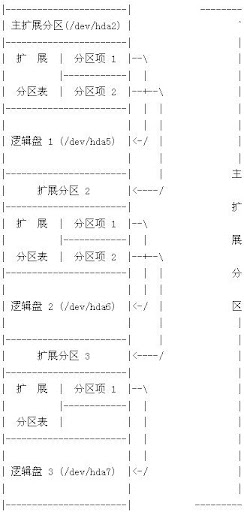
MBR结构&扩展int13h调用详解
第一部分 简 介 |
2008年7月21日星期一
difference between a packet and a frame
A packet and a frame are both packages of data moving through a network.
A packet exists at Layer 3 of the OSI Model, whereas a frame exists at Layer 2 of the OSI Model.
Layer 2 is the Data Link Layer. The best known Data Link Layer protocol is Ethernet.
Layer 3 is the Network Layer. The best know Network Layer protocol is IP (Internet Protocol).
To move through a network, a packet is encapsulated into one or more frames, depending upon the MTU size.
A packet exists at Layer 3 of the OSI Model, whereas a frame exists at Layer 2 of the OSI Model.
Layer 2 is the Data Link Layer. The best known Data Link Layer protocol is Ethernet.
Layer 3 is the Network Layer. The best know Network Layer protocol is IP (Internet Protocol).
To move through a network, a packet is encapsulated into one or more frames, depending upon the MTU size.
TCP/IP 结构模型:4层与 OSI 7层比较
TCP/IP 结构事实上并不严格遵循 OSI 模型。但当前关于如何使用分层模型来描述 TCP/IP 又没有一个统一的协定。一般承认 TCP/IP 比7层 OSI 模型层次少(3到5层)。这里我们以4层 TCP/IP 结构进行讲解。
TCP/IP 结构中忽略了 OSI 模型中的某些特征,只综合了部分相邻 OSI 层的特征并分离其它各层。信息由4层结构中的应用层传送到物理层。当发送数据时,每层将其从上层接收到的信息作为本层数据,并在数据前添加控制信息头,然后一起传送到下一层。每层的接收数据过程与以上发送过程正好相反,其中在数据被传送到上一层之前要将其控制信息头移去。
TCP/IP 4 层模型以及每层主要功能描述如下:
应用层(Application Layer)
TCP/IP 组中的应用层综合了 OSI 应用层、表示层以及会话层的功能。因此,在 TCP/IP 结构中,传输层以上的任何过程都称之为应用。在 TCP/IP 中,使用套接字(socket)和端口描述应用程序通信路径。大多数应用层协议与一个或多个端口号相关联。
传输层(Transport Layer)
TCP/IP 结构中包含两种传输层协议。其一传输控制协议(TCP),确保信息传输过程。其二用户数据报协议(UDP),直接传输数据报,而不需要提供端对端可靠校验。两种协议对应不同的应用具有各自功能。
网络层(Network Layer)
TCP/IP 网络层中的主要协议是网际协议(IP)。所有网络层以下或以上的各层通信在跨越 TCP/IP 协议栈时,都必须通过 IP 完成。此外,网络层还包含部分支持性协议,如 ICMP,实施和管理路由过程。
网络访问层(Network Access Layer)
在 TCP/IP 结构中,网络访问层由数据链路层和物理层合并而成。TCP/IP 网络访问层并没有重新定义新标准,而是有效利用原有数据链路层和物理层标准。很多 RFC 中描述了 IP 如何使用数据链路协议并作为其接口界面,如以太网、令牌环、FDDI、HSSI 和 ATM 等。物理层中规定了硬件通信属性,但它不直接作为网络层及以上层的 TCP/IP 协议的接口。

TCP/IP 4 层模型
另: OSI 7层
7 Application
6 Presentation
5 Session
4 Transport
3 Network
2 Data Link
1 Physical
layer 5 6 7 are not part of the tcp/ip stack
TCP/IP 结构中忽略了 OSI 模型中的某些特征,只综合了部分相邻 OSI 层的特征并分离其它各层。信息由4层结构中的应用层传送到物理层。当发送数据时,每层将其从上层接收到的信息作为本层数据,并在数据前添加控制信息头,然后一起传送到下一层。每层的接收数据过程与以上发送过程正好相反,其中在数据被传送到上一层之前要将其控制信息头移去。
TCP/IP 4 层模型以及每层主要功能描述如下:
应用层(Application Layer)
TCP/IP 组中的应用层综合了 OSI 应用层、表示层以及会话层的功能。因此,在 TCP/IP 结构中,传输层以上的任何过程都称之为应用。在 TCP/IP 中,使用套接字(socket)和端口描述应用程序通信路径。大多数应用层协议与一个或多个端口号相关联。
传输层(Transport Layer)
TCP/IP 结构中包含两种传输层协议。其一传输控制协议(TCP),确保信息传输过程。其二用户数据报协议(UDP),直接传输数据报,而不需要提供端对端可靠校验。两种协议对应不同的应用具有各自功能。
网络层(Network Layer)
TCP/IP 网络层中的主要协议是网际协议(IP)。所有网络层以下或以上的各层通信在跨越 TCP/IP 协议栈时,都必须通过 IP 完成。此外,网络层还包含部分支持性协议,如 ICMP,实施和管理路由过程。
网络访问层(Network Access Layer)
在 TCP/IP 结构中,网络访问层由数据链路层和物理层合并而成。TCP/IP 网络访问层并没有重新定义新标准,而是有效利用原有数据链路层和物理层标准。很多 RFC 中描述了 IP 如何使用数据链路协议并作为其接口界面,如以太网、令牌环、FDDI、HSSI 和 ATM 等。物理层中规定了硬件通信属性,但它不直接作为网络层及以上层的 TCP/IP 协议的接口。

TCP/IP 4 层模型
另: OSI 7层
7 Application
6 Presentation
5 Session
4 Transport
3 Network
2 Data Link
1 Physical
layer 5 6 7 are not part of the tcp/ip stack
2008年7月16日星期三
lkd2 笔记 1
comments 20080708
内核通常由:
1.负责响应中断的中断服务程序
2.管理多个进程分享处理器时间的调度程序
3.负责管理进程地址空间的内存管理程序
4.网络、进程间通信的系统服务程序组成
处理器在任何指定时间点上的活动范围:
1.内核空间,处于进程上下文, 代表某个特定进程在执行
2.内核空间,处于中断上下文, 与任何进程无关, 处理某个特定中断
3.用户空进,执行用户进程Linux内核并不区分线程和其他一般的进程.对内核来说, 所有的进程都一样,只不过是其中的一些共享资源而已。
comments 20080709
内核开发中必须牢记的:
1.no libc
2.Gnuc 扩展. 内核使用到的c扩展
a. inline 消除函数调用和返回的开销(寄存器存储和恢复) You should use static while defining inline function. such as static inline void dog(int size); 内联函数必须在使用之前就定义好, 否则编译器没法把这个函数展开. 实践中一般在头文件中定义内联函数。
b. 内联汇编 在偏近底层或对执行时间有严格要求的地方,一般使用汇编语言。
c. 分支声明,对于条件选择语句,gcc内建了一条指令用于优化, 在一个条件经常出现或者该条件很少出现的时候 编译器可以根据这条指令对条件选择分支进行优化。比如 likely() unlikely() 例子: if(likely(foo)){ ...; } /* foo 通常都不会为0 */ if(unlikely(foo)){ ...; } /* foo 通常都为0 */ 使用分支声明 一定要确定 这个条件绝大多数条件下都成立。使用得当,性能会得到提升,否则反而会下降。 unlikely() 在内核使用的更广泛,因为if往往判断一种特殊的情况。
3. 没有内存保护机制,内核中发生的内存错误会导致oops。 内核中内存都不分页,每用掉一个字节,物理内存就减少一个字节。加新功能必须注意。
4. 不要轻易在内核中使用浮点数
5. 容量小而固定的栈 内核栈大小随体系结构而变。x86上栈的大小在编译时配置可以是8k也可以是4k。 从历史上来说, 栈的大小是两页。It means, 32bit 8k 64bit 16k
6. 同步和并发
a.linux是抢占式的多任务操作系统,内核必须对多任务进行同步。
b.linux支持多处理器
c.中断是异步到来的 d.linux内核可以抢占 常有解决竞争的办法是使用自旋锁和信号量
7. 可移植性的重要性 大部分c代码应该与体系无关。诸如保持字节序,64位对齐,不假定字长和页面长度等准则都有助于移植性
Chapter 3
linux系统的线程实现非常特别, 它对线程和进程并不特别区分。对linux而言线程只不过是一种特殊的进程线程之间(同一进程中的线程)可以共享虚拟内存,但拥有各自的虚拟处理器comments 20080710
2.6内核为每个进程分配一个内核栈 大小为8k(两个页,可配置)。在栈的尾端保存一个thread_info结构. 这种方式便于计算thread_info的地址. current() thread_info->task存放的是指向该任务实际task_struct的指针x86系统上 current通过current_thread_info()计算thread_info地址。该操作把栈指针的后13位屏蔽 %esp andl ~(8192-1) (假定栈大小是8k)esp 是栈寄存器最后current 通过current_thread_info->task;得到task_struct的地址
process state:
As its name implies, the state field of the process descriptor describes what is currently happening to the process. It consists of an array of flags, each of which describes a possible process state. In the current Linux version, these states are mutually exclusive, and hence exactly one flag of state always is set; the remaining flags are cleared.
The following are the possible process states:
TASK_RUNNINGThe process is either executing on a CPU or waiting to be executed.
TASK_INTERRUPTIBLEThe process is suspended (sleeping) until some condition becomes true. Raising a hardware interrupt, releasing a system resource the process is waiting for, or delivering a signal are examples of conditions that might wake up the process (put its state back to TASK_RUNNING).
TASK_UNINTERRUPTIBLELike TASK_INTERRUPTIBLE, except that delivering a signal to the sleeping process leaves its state unchanged. This process state is seldom used. It is valuable, however, under certain specific conditions in which a process must wait until a given event occurs without being interrupted. For instance, this state may be used when a process opens a device file and the corresponding device driver starts probing for a corresponding hardware device. The device driver must not be interrupted until the probing is complete, or the hardware device could be left in an unpredictable state.
TASK_STOPPEDProcess execution has been stopped; the process enters this state after receiving a SIGSTOP, SIGTSTP, SIGTTIN, or SIGTTOU signal.
TASK_TRACEDProcess execution has been stopped by a debugger. When a process is being monitored by another (such as when a debugger executes a ptrace( ) system call to monitor a test program), each signal may put the process in the TASK_TRACED state.
-----------------------------------------------------
Two additional states of the process can be stored both in the state field and in the exit_state field of the process descriptor; as the field name suggests, a process reaches one of these two states only when its execution is terminated:
EXIT_ZOMBIE Process execution is terminated, but the parent process has not yet issued a wait4( ) or waitpid( ) system call to return information about the dead process. [*]Before the wait( )-like call is issued, the kernel cannot discard the data contained in the dead process descriptor because the parent might need it. [*] There are other wait( ) -like library functions, such as wait3( ) and wait( ), but in Linux they are implemented by means of the wait4( ) and waitpid( ) system calls.
EXIT_DEAD The final state: the process is being removed by the system because the parent process has just issued a wait4( ) or waitpid( ) system call for it.
Changing its state from EXIT_ZOMBIE to EXIT_DEADavoids race conditions due to other threads of execution that execute wait( )-like calls on the same process.The value of the state field is usually set with a simple assignment.
For instance: p->state = TASK_RUNNING;
The kernel also uses the set_task_state and set_current_state macros: they set the state of a specified process and of the process currently executed, respectively. Moreover, these macros ensure that the assignment operation is not mixed with other instructions by the compiler or the CPU control unit. Mixing the instruction order may sometimes lead to catastrophic results.
当一个程序执行了系统调用或者触发了某个异常,它就陷入内核空间。此时,我们称内核“代表进程执行"并处于进程上下文中。系统调用和异常处理程序是对内核明确定义的接口,进程只有通过这些接口才能陷入内核执行。系统中所有进程都是init进程的后代,系统中的每一个进程都有一个父进程init进程的task_struct是作为init_task静态分配的。next_task() prev_task() 实现访问前一个和后一个进程task_struct for_each_task() 遍历整个任务队列根据元素地址得到包含它的结构地址的方法
typedef struct test{
char a[10];
int b;
short c
;}TEST;
/* ptr: pointer of the member
type: type of the container
member: member name*/
#define container_of(ptr, type, member) ({\ (type *)((char *)ptr - offsetof(type, member));})#define offsetof(TYPE, MEMBER) ((size_t) &((TYPE *)0)->MEMBER)
int main()
{
TEST tmp;
TEST *p;
p = container_of(&tmp.b, TEST, b);
printf("%p, %p\n", &tmp, p)
;}
linux创建进程方式: fork() & exec()fork(): 通过拷贝当前进程创建一个子进程。 与父进程的区别仅仅在于pid ppid以及某些资源和统计量exec(): 负责读取可执行文件, 并将其载入地址空间开始运行写时拷贝,内核并不复制整个进程地址空间,而是让父子进程共享同一个拷贝,只有在写入数据的时候,数据才被复制,从而使父子进程拥有各自的拷贝。
比如:fork()后立即exec()就不需要复制整个父进程的地址空间,这时fork()的实际开销就是复制父进程的也表以及给子进程创建唯一的进程描述符。 这样可以避免拷贝大量根本不会被使用的数据。do_fork() 在copy_process()返回后,新创建的子进程被唤醒并让其投入运行。内核有意这么做,避免写时拷贝的额外开销.vfork()不拷贝父进程的页表项。子进程作为父进程的一个单独的线程在它的地址空间里运行, 父进程被阻塞,直到子进程退出或者执行exec()。
线程在linux里的实现
从内核的角度来说,linux并没有线程的概念,他把所有的线程都当作进程来实现。线程被当作去其他进程共享某些资源的进程。每个线程都有唯一属于自己的task_struct.内核线程 独立运行在内核空间的标准进程内核线程没有独立的地址空间 他的mm指针为NULL 只在内核空间运行。int kernel_thread(int (*fn) (void *), void *arg, unsigned long flag)进程退出 主要靠do_exit()完成。
1.将task_struct->flags = PF_EXITING
2.exit_mm()放弃进程占用的mm_sturct,如果没有别的进程使用他 就彻底释放他
3.exit_sem() _exit_files() _exit_fs() exit_namespace()
4.exit_notify() 修改子进程的父进程。把当前进程状态设置为EXIT_ZOMBIE
5.schedule() 切换到其他进程运行此时进程处于EXIT_ZOMBIE, 他所占的资源只有内核栈 task_struct thread_info.此时进程存在的唯一目的就是向父进程提供信息。
父进程执行wait4()do_wait()->wait_task_zombie()->release_task()->_unhash_process() 从pidhash上删除该进程,同时从task_list删除该进程最后put_task_struct释放内核栈,task_struct and thread_info。
内核通过exit_parent() 来保证结束进程的children不会成为孤儿。 在该进程所在进程组找一个进程作为其children的父进程,如果没有就以init进程作为父进程。这样就可以避免系统中出现永远处于僵死状态的进程。
内核通常由:
1.负责响应中断的中断服务程序
2.管理多个进程分享处理器时间的调度程序
3.负责管理进程地址空间的内存管理程序
4.网络、进程间通信的系统服务程序组成
处理器在任何指定时间点上的活动范围:
1.内核空间,处于进程上下文, 代表某个特定进程在执行
2.内核空间,处于中断上下文, 与任何进程无关, 处理某个特定中断
3.用户空进,执行用户进程Linux内核并不区分线程和其他一般的进程.对内核来说, 所有的进程都一样,只不过是其中的一些共享资源而已。
comments 20080709
内核开发中必须牢记的:
1.no libc
2.Gnuc 扩展. 内核使用到的c扩展
a. inline 消除函数调用和返回的开销(寄存器存储和恢复) You should use static while defining inline function. such as static inline void dog(int size); 内联函数必须在使用之前就定义好, 否则编译器没法把这个函数展开. 实践中一般在头文件中定义内联函数。
b. 内联汇编 在偏近底层或对执行时间有严格要求的地方,一般使用汇编语言。
c. 分支声明,对于条件选择语句,gcc内建了一条指令用于优化, 在一个条件经常出现或者该条件很少出现的时候 编译器可以根据这条指令对条件选择分支进行优化。比如 likely() unlikely() 例子: if(likely(foo)){ ...; } /* foo 通常都不会为0 */ if(unlikely(foo)){ ...; } /* foo 通常都为0 */ 使用分支声明 一定要确定 这个条件绝大多数条件下都成立。使用得当,性能会得到提升,否则反而会下降。 unlikely() 在内核使用的更广泛,因为if往往判断一种特殊的情况。
3. 没有内存保护机制,内核中发生的内存错误会导致oops。 内核中内存都不分页,每用掉一个字节,物理内存就减少一个字节。加新功能必须注意。
4. 不要轻易在内核中使用浮点数
5. 容量小而固定的栈 内核栈大小随体系结构而变。x86上栈的大小在编译时配置可以是8k也可以是4k。 从历史上来说, 栈的大小是两页。It means, 32bit 8k 64bit 16k
6. 同步和并发
a.linux是抢占式的多任务操作系统,内核必须对多任务进行同步。
b.linux支持多处理器
c.中断是异步到来的 d.linux内核可以抢占 常有解决竞争的办法是使用自旋锁和信号量
7. 可移植性的重要性 大部分c代码应该与体系无关。诸如保持字节序,64位对齐,不假定字长和页面长度等准则都有助于移植性
Chapter 3
linux系统的线程实现非常特别, 它对线程和进程并不特别区分。对linux而言线程只不过是一种特殊的进程线程之间(同一进程中的线程)可以共享虚拟内存,但拥有各自的虚拟处理器comments 20080710
2.6内核为每个进程分配一个内核栈 大小为8k(两个页,可配置)。在栈的尾端保存一个thread_info结构. 这种方式便于计算thread_info的地址. current() thread_info->task存放的是指向该任务实际task_struct的指针x86系统上 current通过current_thread_info()计算thread_info地址。该操作把栈指针的后13位屏蔽 %esp andl ~(8192-1) (假定栈大小是8k)esp 是栈寄存器最后current 通过current_thread_info->task;得到task_struct的地址
process state:
As its name implies, the state field of the process descriptor describes what is currently happening to the process. It consists of an array of flags, each of which describes a possible process state. In the current Linux version, these states are mutually exclusive, and hence exactly one flag of state always is set; the remaining flags are cleared.
The following are the possible process states:
TASK_RUNNINGThe process is either executing on a CPU or waiting to be executed.
TASK_INTERRUPTIBLEThe process is suspended (sleeping) until some condition becomes true. Raising a hardware interrupt, releasing a system resource the process is waiting for, or delivering a signal are examples of conditions that might wake up the process (put its state back to TASK_RUNNING).
TASK_UNINTERRUPTIBLELike TASK_INTERRUPTIBLE, except that delivering a signal to the sleeping process leaves its state unchanged. This process state is seldom used. It is valuable, however, under certain specific conditions in which a process must wait until a given event occurs without being interrupted. For instance, this state may be used when a process opens a device file and the corresponding device driver starts probing for a corresponding hardware device. The device driver must not be interrupted until the probing is complete, or the hardware device could be left in an unpredictable state.
TASK_STOPPEDProcess execution has been stopped; the process enters this state after receiving a SIGSTOP, SIGTSTP, SIGTTIN, or SIGTTOU signal.
TASK_TRACEDProcess execution has been stopped by a debugger. When a process is being monitored by another (such as when a debugger executes a ptrace( ) system call to monitor a test program), each signal may put the process in the TASK_TRACED state.
-----------------------------------------------------
Two additional states of the process can be stored both in the state field and in the exit_state field of the process descriptor; as the field name suggests, a process reaches one of these two states only when its execution is terminated:
EXIT_ZOMBIE Process execution is terminated, but the parent process has not yet issued a wait4( ) or waitpid( ) system call to return information about the dead process. [*]Before the wait( )-like call is issued, the kernel cannot discard the data contained in the dead process descriptor because the parent might need it. [*] There are other wait( ) -like library functions, such as wait3( ) and wait( ), but in Linux they are implemented by means of the wait4( ) and waitpid( ) system calls.
EXIT_DEAD The final state: the process is being removed by the system because the parent process has just issued a wait4( ) or waitpid( ) system call for it.
Changing its state from EXIT_ZOMBIE to EXIT_DEADavoids race conditions due to other threads of execution that execute wait( )-like calls on the same process.The value of the state field is usually set with a simple assignment.
For instance: p->state = TASK_RUNNING;
The kernel also uses the set_task_state and set_current_state macros: they set the state of a specified process and of the process currently executed, respectively. Moreover, these macros ensure that the assignment operation is not mixed with other instructions by the compiler or the CPU control unit. Mixing the instruction order may sometimes lead to catastrophic results.
当一个程序执行了系统调用或者触发了某个异常,它就陷入内核空间。此时,我们称内核“代表进程执行"并处于进程上下文中。系统调用和异常处理程序是对内核明确定义的接口,进程只有通过这些接口才能陷入内核执行。系统中所有进程都是init进程的后代,系统中的每一个进程都有一个父进程init进程的task_struct是作为init_task静态分配的。next_task() prev_task() 实现访问前一个和后一个进程task_struct for_each_task() 遍历整个任务队列根据元素地址得到包含它的结构地址的方法
typedef struct test{
char a[10];
int b;
short c
;}TEST;
/* ptr: pointer of the member
type: type of the container
member: member name*/
#define container_of(ptr, type, member) ({\ (type *)((char *)ptr - offsetof(type, member));})#define offsetof(TYPE, MEMBER) ((size_t) &((TYPE *)0)->MEMBER)
int main()
{
TEST tmp;
TEST *p;
p = container_of(&tmp.b, TEST, b);
printf("%p, %p\n", &tmp, p)
;}
linux创建进程方式: fork() & exec()fork(): 通过拷贝当前进程创建一个子进程。 与父进程的区别仅仅在于pid ppid以及某些资源和统计量exec(): 负责读取可执行文件, 并将其载入地址空间开始运行写时拷贝,内核并不复制整个进程地址空间,而是让父子进程共享同一个拷贝,只有在写入数据的时候,数据才被复制,从而使父子进程拥有各自的拷贝。
比如:fork()后立即exec()就不需要复制整个父进程的地址空间,这时fork()的实际开销就是复制父进程的也表以及给子进程创建唯一的进程描述符。 这样可以避免拷贝大量根本不会被使用的数据。do_fork() 在copy_process()返回后,新创建的子进程被唤醒并让其投入运行。内核有意这么做,避免写时拷贝的额外开销.vfork()不拷贝父进程的页表项。子进程作为父进程的一个单独的线程在它的地址空间里运行, 父进程被阻塞,直到子进程退出或者执行exec()。
线程在linux里的实现
从内核的角度来说,linux并没有线程的概念,他把所有的线程都当作进程来实现。线程被当作去其他进程共享某些资源的进程。每个线程都有唯一属于自己的task_struct.内核线程 独立运行在内核空间的标准进程内核线程没有独立的地址空间 他的mm指针为NULL 只在内核空间运行。int kernel_thread(int (*fn) (void *), void *arg, unsigned long flag)进程退出 主要靠do_exit()完成。
1.将task_struct->flags = PF_EXITING
2.exit_mm()放弃进程占用的mm_sturct,如果没有别的进程使用他 就彻底释放他
3.exit_sem() _exit_files() _exit_fs() exit_namespace()
4.exit_notify() 修改子进程的父进程。把当前进程状态设置为EXIT_ZOMBIE
5.schedule() 切换到其他进程运行此时进程处于EXIT_ZOMBIE, 他所占的资源只有内核栈 task_struct thread_info.此时进程存在的唯一目的就是向父进程提供信息。
父进程执行wait4()do_wait()->wait_task_zombie()->release_task()->_unhash_process() 从pidhash上删除该进程,同时从task_list删除该进程最后put_task_struct释放内核栈,task_struct and thread_info。
内核通过exit_parent() 来保证结束进程的children不会成为孤儿。 在该进程所在进程组找一个进程作为其children的父进程,如果没有就以init进程作为父进程。这样就可以避免系统中出现永远处于僵死状态的进程。
2008年7月10日星期四
install kernel source for fedora8
学习kernel过程中,源代码必不可少, 一般情况下安装好的系统都不带source code。
找了个安装source code的方式:
Install Kernel Source
07 November 2007
Installing the kernel source is typically NOT needed unless you wish to re-compile your kernel or for some special development. However in some cases the kernel headers may be required.
There are 3 basic steps involved in installing the kernel source.
Download the desired kernel source (matching your current kernel if required)
Installing the SRC.RPM package
Using rpmbuild to prepare the source into a usable state
NOTE: Following these steps will consume at least 400MB of disk space!
1. Download the Kernel Source
Obtaining Kernel Source (for default Fedora 8 kernel)
The default kernel source can be found through any Fedora mirror. Look in the directory "/source/SRPMS/" under the "/8/" directory . For example: http://download.fedora.redhat.com/pub/fedora/linux/releases/8/Fedora/source/SRPMS/.
kernel-2.6.23.1-42.fc8.src.rpm 31-Oct-2007 00:06 46M
Obtaining Kernel Source (for an updated Fedora 8 kernel)
If you updated your kernel, then the typically the last 2 or 3 releases of the source of the kernel will be available though the Fedora updates. IF YOU REQUIRE you can (try to) match the kernel source with your running kernel.
Look in the update directory on most Fedora mirror sites. For example: http://download.fedora.redhat.com/pub/fedora/linux/updates/8/SRPMS/.
Obtaining Kernel Source through 'yum' (for latest Fedora 8 kernel)
There are yum utilities which will download the LATEST kernel source. If it does not find anything, then there are no updates (yet) use the DEFAULT Fedora kernel source.
[mirandam@charon ~]$ sudo yum install yum-utils[mirandam@charon ~]$ cd downloads[mirandam@charon downloads]$ yumdownloader --source kernel
2. Install the Kernel Source
Install the kernel.src.rpm that you chose to download in the previous steps.
[mirandam@charon downloads]$ sudo rpm -ivh kernel-2.6.23.1-42.fc8.src.rpm 1:kernel ########################################### [100%]
Ignore group kojibuilder does not exist or user kojibuilder does not exist warnings.
3. Prepare the Source
To prepare the source to be useable:
[mirandam@charon downloads]$ sudo rpmbuild -bp --target=$(uname -m) /usr/src/redhat/SPECS/kernel.spec
The source files will be properly located in /usr/src/redhat/BUILD/kernel-2.6.23/. There are 2 useful directories:
linux-2.6.23.ARCH/
This will have the standard kernel.org kernel WITH Fedora patches and updates. The ARCH architecture will match the output of uname -m, usually i686. You may use noarch for the --target= option if you wish.
vanilla/
This will have the standard kernel.org kernel ONLY (no patches or updates).
NOTE: The process Fedora uses to build and configure kernels can be found in greater depth on the Fedora Wiki. The above information is very basic and meant to allow access to the source and not necessarily build it.
找了个安装source code的方式:
Install Kernel Source
07 November 2007
Installing the kernel source is typically NOT needed unless you wish to re-compile your kernel or for some special development. However in some cases the kernel headers may be required.
There are 3 basic steps involved in installing the kernel source.
Download the desired kernel source (matching your current kernel if required)
Installing the SRC.RPM package
Using rpmbuild to prepare the source into a usable state
NOTE: Following these steps will consume at least 400MB of disk space!
1. Download the Kernel Source
Obtaining Kernel Source (for default Fedora 8 kernel)
The default kernel source can be found through any Fedora mirror. Look in the directory "/source/SRPMS/" under the "/8/" directory . For example: http://download.fedora.redhat.com/pub/fedora/linux/releases/8/Fedora/source/SRPMS/.
kernel-2.6.23.1-42.fc8.src.rpm 31-Oct-2007 00:06 46M
Obtaining Kernel Source (for an updated Fedora 8 kernel)
If you updated your kernel, then the typically the last 2 or 3 releases of the source of the kernel will be available though the Fedora updates. IF YOU REQUIRE you can (try to) match the kernel source with your running kernel.
Look in the update directory on most Fedora mirror sites. For example: http://download.fedora.redhat.com/pub/fedora/linux/updates/8/SRPMS/.
Obtaining Kernel Source through 'yum' (for latest Fedora 8 kernel)
There are yum utilities which will download the LATEST kernel source. If it does not find anything, then there are no updates (yet) use the DEFAULT Fedora kernel source.
[mirandam@charon ~]$ sudo yum install yum-utils[mirandam@charon ~]$ cd downloads[mirandam@charon downloads]$ yumdownloader --source kernel
2. Install the Kernel Source
Install the kernel.src.rpm that you chose to download in the previous steps.
[mirandam@charon downloads]$ sudo rpm -ivh kernel-2.6.23.1-42.fc8.src.rpm 1:kernel ########################################### [100%]
Ignore group kojibuilder does not exist or user kojibuilder does not exist warnings.
3. Prepare the Source
To prepare the source to be useable:
[mirandam@charon downloads]$ sudo rpmbuild -bp --target=$(uname -m) /usr/src/redhat/SPECS/kernel.spec
The source files will be properly located in /usr/src/redhat/BUILD/kernel-2.6.23/. There are 2 useful directories:
linux-2.6.23.ARCH/
This will have the standard kernel.org kernel WITH Fedora patches and updates. The ARCH architecture will match the output of uname -m, usually i686. You may use noarch for the --target= option if you wish.
vanilla/
This will have the standard kernel.org kernel ONLY (no patches or updates).
NOTE: The process Fedora uses to build and configure kernels can be found in greater depth on the Fedora Wiki. The above information is very basic and meant to allow access to the source and not necessarily build it.
订阅:
博文 (Atom)
